LancerCalc
A live suite of six free tax and pricing calculators for freelancers — no sign-up, with a worked example on screen before anyone types anything.
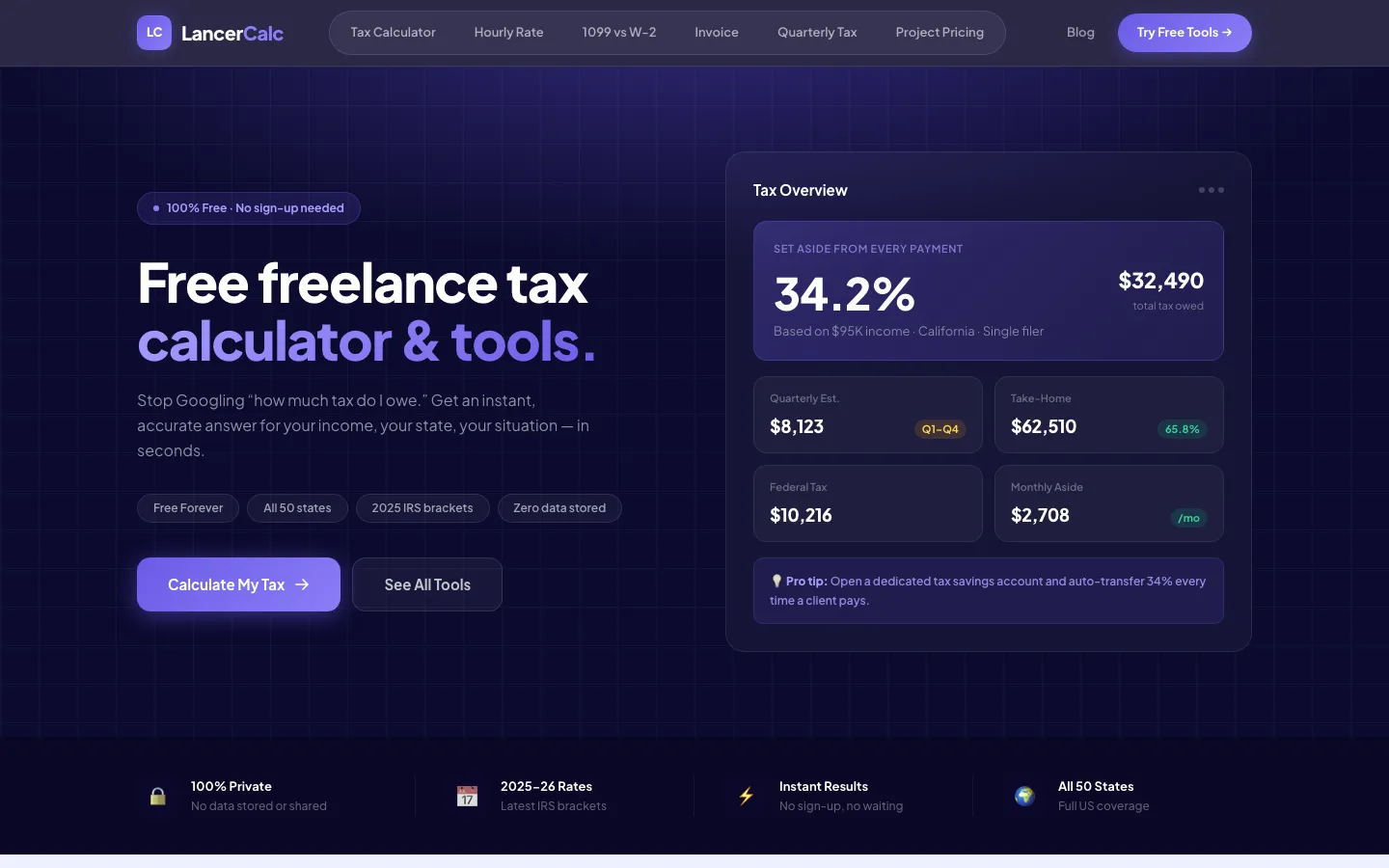
A filled-in example before you type anything: $95K in California, 34.2% tax, $62,510 take-home. Showing the answer first is what earns the input.
Six tools, no sign-up, and the answer visible before you type.
Six separate calculators — tax, hourly rate, 1099 vs W-2, invoice, quarterly tax and project pricing — each on its own page
A worked example rendered on arrival, before the visitor enters anything
Results broken into the numbers a freelancer actually plans around: quarterly payments, monthly set-aside, take-home
Free with no account required, stated plainly as "100% Free · No sign-up needed"
A blog and newsletter built around the same questions the calculators answer
One tool per page, so each can rank for its own search
Show the answer before you ask for anything
The homepage arrives with the calculator already filled in: $95,000 of income, California, filing single. It returns 34.2%, $32,490 owed, $8,123 due each quarter, $62,510 take-home.
That is not a screenshot, it is the working tool with sensible defaults, and it inverts the usual order. Most calculator sites present an empty form and ask for a salary before showing anything — which asks a stranger to hand over personal financial details on the promise that something useful might follow. Filling it in first removes the gamble. A visitor sees the shape of the answer, understands what the tool gives back, and only then decides whether to swap in their own figures. By the time they type, they already know it is worth the effort.
Answer the question they actually have
A freelancer typing their income into a tax calculator is rarely curious about their tax rate in the abstract. They want to know what to set aside, and when.
So the output is broken into the numbers a person plans around rather than the one an accountant would lead with. The headline percentage is there, but so is the quarterly estimated payment, the monthly set-aside, and the take-home figure. Those are the numbers that translate into a decision — what moves to the savings account on the first of the month, what is genuinely available to live on.
This is the difference between a calculator that is correct and one that is useful. Both compute the same liability. Only one of them tells a self-employed person what to do on Monday.
Six tools, six pages, six searches
The site runs six calculators: income tax, hourly rate, 1099 versus W-2, invoice, quarterly tax and project pricing. Each has its own page and its own URL.
That is a search decision as much as a product one. Somebody working out what to charge per hour and somebody comparing a contract offer against a salaried job are asking completely different questions, in completely different words, at completely different points in their working life. One page trying to serve both ranks for neither. Six pages, each answering one question thoroughly, gives six entry points — and every one of them lands a visitor on a tool that does exactly what they searched for.
The blog and newsletter extend the same logic. They cover the questions surrounding the calculations, which is where people who do not yet know a calculator exists are searching.
No sign-up, on purpose
Every tool is free and none of them asks for an account. The site says so directly — "100% Free · No sign-up needed" — rather than leaving the visitor to find out by trying.
The reasoning is that a sign-up wall in front of a calculator is a toll booth in front of a thing the visitor could compute in a spreadsheet if sufficiently annoyed. It converts a small number of visitors into leads and everyone else into someone using a competitor. Removing it entirely means the tool is judged on whether it is good, which is the only ground worth competing on — and the newsletter, offered after the answer rather than in front of it, ends up asked of a far warmer audience.
Four things you can check on the live site right now.
- 1Open the homepage and note the calculator is already showing a worked result before you touch it.
- 2Check the outputs: quarterly payment and monthly set-aside sit alongside the headline rate.
- 3Open two of the six tools and confirm each has its own page and URL rather than a shared one.
- 4Try to reach a result without an account. There is nothing in the way.
Want a tool like this built for your business?
Book a free consultation. We'll show you what we'd build for you, and what it would take.